


You can view Dynamics NAV Standard Objects Code and Extension code in RTC by following the below steps.
Prerequisite:
Code Viewer Control AddIn
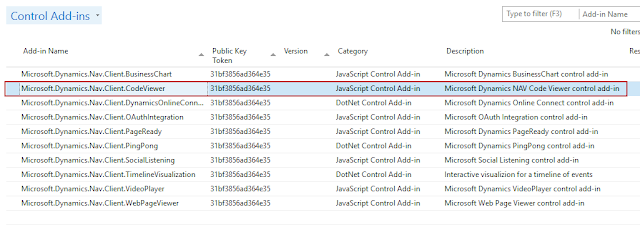
View Standard Objects Code in RTC
CAL Language is used in Dynamics NAV Objects. CAL is converted into C# at Compile Time. DotNet Framework then handles the converted C# code when object is ran and the appropriate result is displayed.
NAV saves this code in table 2000000071 Object Metadata.
Blob Fields:
- User AL Code contains the C/Al code of the object.
- User Code contains the C# code of the same object which is generated when the object is compiled.
This would also allow you to see code of objects which are not in your License range.
Create a simple Page “RTC Standard Objects Code” in NAV 2017 to see this code in RTC. Please see below snapshots for details.
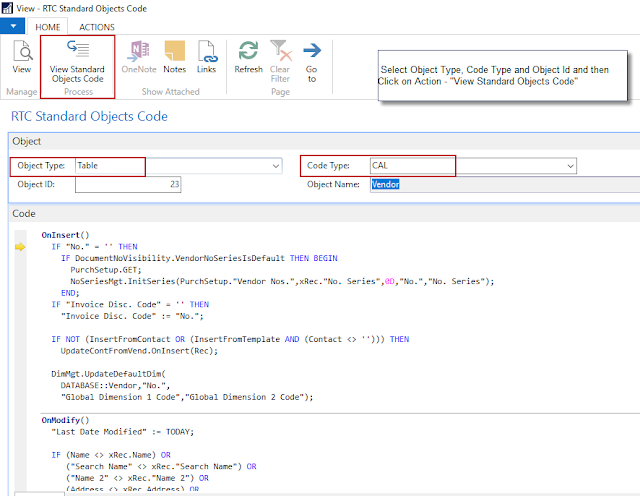
1. View Standard Code Objects – C/AL
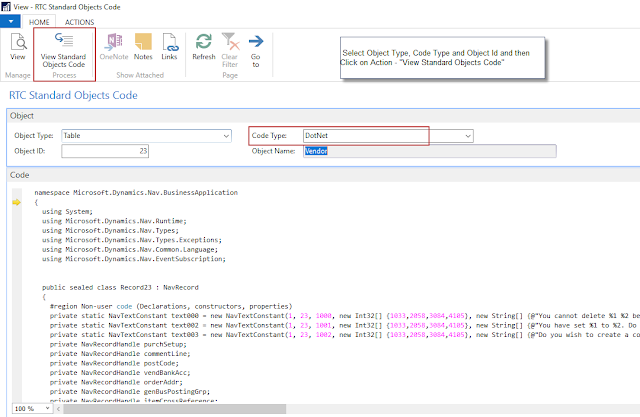
- Select Object Type (Example – Table, Report, Codeunit, Page, Etc.)
- Select Code Type (CAL, DotNet)
- Enter Object Id
- Click on Action – “View Standard Objects Code” You will see the Code in Code Tab.
2. View Standard Code Objects – DotNet
View Extension Code in RTC
Once the extension is installed for a tenant, you cannot see the objects in Developer environment. NAV stores these objects in table 2000000150 (Nav App Object Metadata).
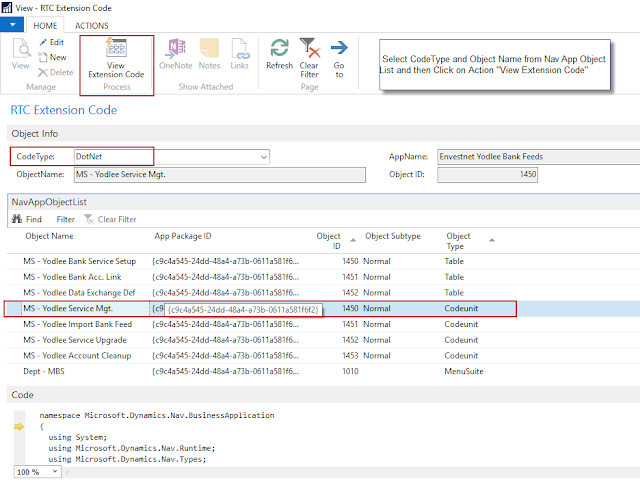
Create a simple Page “RTC Extension Code” and “Nav App Object List” in NAV 2017 to see this code in RTC. Please see below snapshots for details.
3. NAV Installed Extensions

4. View Extension Code – C/AL
- Select Code Type (CAL, DotNet)
- Select Object Name from Nav APP Object List
- Click on Action – “View Extension Code” You will see the Code in Code Tab.
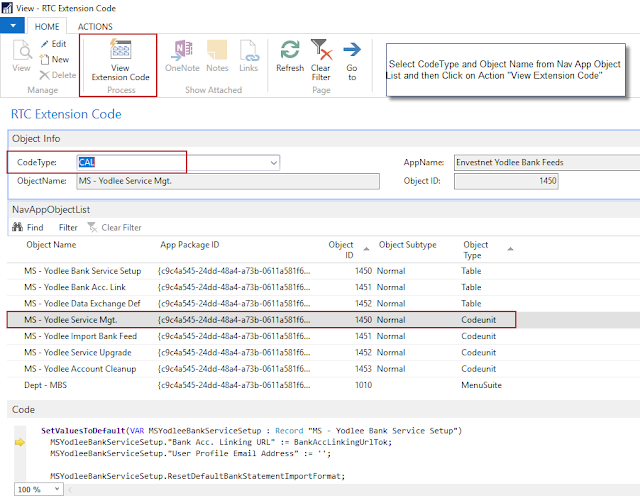
5. View Extension Code – DotNet
You can download the Objects from here.
For more such tips and tricks about Dynamics NAV, check out my blog.
About Intech
Intech Systems is a three-cloud Microsoft-certified partner that boasts deep expertise in providing digital transformation solutions for organizations by leveraging the Microsoft 365, Dynamics 365, and Azure solution stack. Intech is recognized as a top-tier Microsoft implementation partner globally and specializes in transformative technology solutions such as ERP (Enterprise Resource Planning), CRM (Customer Relationship Management), Business Process Automation, Business Intelligence, Cloud Infrastructure, Data Management, Productivity & Collaboration and Generative AI (Gen-AI) solutions. As a trusted Microsoft Solutions Partner, we are capable of doing complex technology implementations catered to an organization’s specific needs & also rapid solution implementation such as our Microsoft Dynamics 365 Business Central implementation packages. We pair our implementations with end-to-end customer support, offshore development & 3rd party integrations. With offices in India, USA (United States of America), and Singapore, we work with clients across globe to empower businesses with cutting-edge technology solutions. Our latest services aim at delivering business ready AI solutions to the customer, like our Microsoft Copilot Consulting Services & Solutions for small, medium & large enterprises. Intech’s expertise lies in building software solutions for Manufacturing, Professional Services & Healthcare. Our Dealer Management System, Sales and Service CRM for Manufacturing, Field Force Automation for Pharmaceuticals and Manufacturing Central are some of our leading industry solutions. Intech’s vision is to catalyze digital futures for operation-centric industries globally, we are at the forefront of innovation, helping organizations drive growth and innovation like never before. Contact Us to learn more.
About the Author

Related Posts

So, you have successfully implemented an ERP software in your company and you are looking forward to start getting its benefits. But selecting just a right ERP software is not…

There are no hidden reasons for having an ERP system in the organization. We have already by far acknowledged the benefits of applying the technology in the business process. Ever…
Unified Interface in Dynamics 365
Unified Interface in Dynamics 365 is all about cleaner user experience and a friendly interface. The new and improved UI updates the aspect and feel of the software with a…